
Curriculum links
WA HPE Curriculum
Sub-strand: Staying safe
- Health information, services and help-seeking strategies that young people can use in a variety of situations.
- Protective behaviours and help-seeking strategies to ensure safety in a variety of situations, including online.
- Strategies to make informed choices to promote health, safety and wellbeing.
Sub-strand: Healthy and active communities
- Preventive health practices for young people to avoid and manage risk
International technical guidance on sexuality education
Key concept 4.1 Violence
- Sexual abuse, sexual harassment and bullying (including cyberbullying) are harmful and it is important to seek support if experiencing them.
Key concept 4.3 Safe use of information and communication technologies
- Internet and social media use require special care and consideration.
Key concept 5.3 Communication, refusal and negotiation skills
- Effective communication uses different modes and styles, and is important to expressing and understanding wishes, needs and personal boundaries.
Materials
- Student Activity Sheet: THINK and protect yourself and others online [one per student]
- Student Activity Sheet: Digital me [one per student]
- Teaching resource: #GameOn Cyber safety series (22min 5 sec)
Before you get started
- Communicating online is an increasingly accessible and a key way of communication between young people. It is important that the positives of online communication are highlighted as strongly as the potential concerns. The most important lesson for young people is that they learn to be responsible with technology and know how to use it safely. Refer to the Educator notes: Adolescent relationships, Cyberbullying, Cyberstalking for more information on this topic.
- Despite the social media delay for under-16 years olds, young people are still going online and have the capacity to communicate with others (including people they know and people they don't know).
- Teachers should know and understand the protective interrupting technique and what, why, when and how it is needed and used before facilitating this activity. It is important that teachers are familiar with the Dealing with disclosures Guide and have a risk management strategy in place. Note: A student can talk to the Kids Helpline on 1800 55 1800 in confidence.
- It is important that messages about safe online behaviours are repeated at home.
Learning activities
Group agreement
5 mins
Teaching tip: A group agreement must be established before any Relationships and Sexuality Education (RSE) program begins to ensure a safe learning environment. Read: Essential tools: Establishing a group agreement for tips on how to create one and what to include.
- Revise or create the class group agreement.
What do you do when you're online?
5 mins
Teaching tip: You can use a grouping strategy to form small groups to discuss (see Essential tools: Grouping strategies) or ask students to raise their hand and share with the whole classroom.
- Ask
Who uses the internet at home?
What do you use to go on to the internet?
(mobile phone, iPad, laptop, home computer, video gaming devices)
What is your favourite online activity?
Who uses the internet for messaging and chatting?
Who has a mobile phone with a camera and internet?
What are the rules about using the internet at your house?
Looking after yourself online
30 mins
- Have students form small groups. Show students each story in the #GameOn cyber safety series (22min 5sec) and as it plays ask them what issues about online behaviours were being addressed in this episode.
- At the end, ask:
What were the main unsafe/unhealthy online behaviours highlighted in this video? Why?
What were the main safe/healthy online behaviours highlighted in this video? Why?
If you were a friend of one of the characters in #GameOn, how could you encourage them to make safer/healthier choices online?
How do you become online friends with someone you have never met before?
What are the differences between online friends and in-person friends?
Why should you be cautious about making friends with people online?
- Re-iterate with the students that being online is often fun, and a way for us to connect with people. But we need to be aware of communicating with people we have only meet online, and never in-person.
What to share and what not to share?
15 mins
- Have students perform a thumbs up thumbs down voting strategy with the below statement, and the following questions.
If you had an online friend who was not an in-person friend, would you answer this question if they asked you:
- What is your favourite colour?
- Where do you go to school?
- Do you have a pet?
- Do you like playing computer games?
- Which suburb do you live in?
- How many people in your family?
- What is your favourite song?
- What do you like to do on the weekend?
- What sport do you play?
- Who is your favourite actor?
- Do your parents take you to school?
- What do you want to do when you grow up?
- How old are you?
- Ask
What sort of information do people need to think very carefully about before putting it online, sending it to others, or letting others know?
(any information that gives away a person’s personal information such as their full name, date of birth, address, school, email addresses, online profiles, passwords, bank details and family and friends’ personal information. Also, photos provide important personal information, and should not be posted online without careful thought. Once something has been put online, the owner loses control of it, and it could stay online forever).
How would you feel if this information about you was displayed at your local shopping centre? How is giving this information to an online friend very similar to this?
- Discuss the safety skills outlined in the Student Activity Sheet: THINK and protect yourself and others online.
3-2-1 Reflection
Online behaviour reflection
5 mins
- The Australian Government recommends that 5–18-year-olds should limit their recreational screen time to two hours per day1.
- Ask
Do you think you spend more time online than the experts recommend?
Do you think you should change your online behaviour?
- Having spent time thinking about their own digital use and exploring safe/healthy and unsafe/unhealthy online behaviours, students now choose two digital devices that they use regularly and complete the following tasks.
- Design a Responsible Use Policy for your device. A responsible use policy is a set of rules that explains the do's and don’ts of behaviour for using a particular device (include safety tips and recommended daily use times).
- Suggest students pin their responsible use policy in clear view in their bedroom or use a magnet to secure it to the fridge for other family members to see.
Teaching tip: This can be done as homework, as an additional lesson or as an assessment task):
1 Department of Health and Ageing. Australia’s Physical Activity Recommendations for 5-12 year olds. Commonwealth of Australia, 2004a.
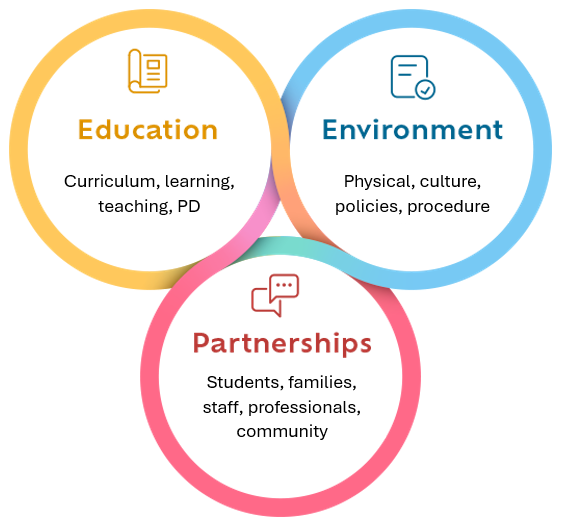
Health promoting schools
Educator note: Health promoting schools framework.
Environment
Culture
- School staff do not shame students for being online.
Policies
- Anti-bullying or anti-discrimination policies extend to online communication between students, not just what occurs at school.
Partnerships
Family
- Talk Soon. Talk Often: a guide for parents talking to their kids about sex is a free hardcopy resource that can be bulk ordered by schools and website. Send a copy home to parents prior to starting your RSE program. The booklet offers ages and stage related information on puberty (and other topics) so that parents can reinforce the topics covered in class. (How to order hard copies.) Provide the link to parents on school websites and social media.
- Run a parent workshop and run this activity with parents to model the content that will be covered in your RSE program.
- Run a parent and child evening session, where the children can teach the parents what they have been learning about.